
Docker Desktop Alternative for macOS
Manage Docker on macOS
without Docker Desktop
Native Docker and Kubernetes GUI that uses ~200MB instead of 2GB+. Built with SwiftUI, not Electron. Containers, Compose, and K8s clusters - all in one app.
$29.99 one-time · no subscription · macOS 13.0+ · 1.4k+ downloads
Native Performance
~200MB memory vs 2GB+ for Electron apps
Unified Workflow
Docker, Compose, and K8s in one interface
Security Built-In
CVE scanning with built-in remediation
Developer-First
Powerful features without complexity
On-Device AI
Explain build errors & triage scans, privately
See It in Action
Features no other Docker GUI has
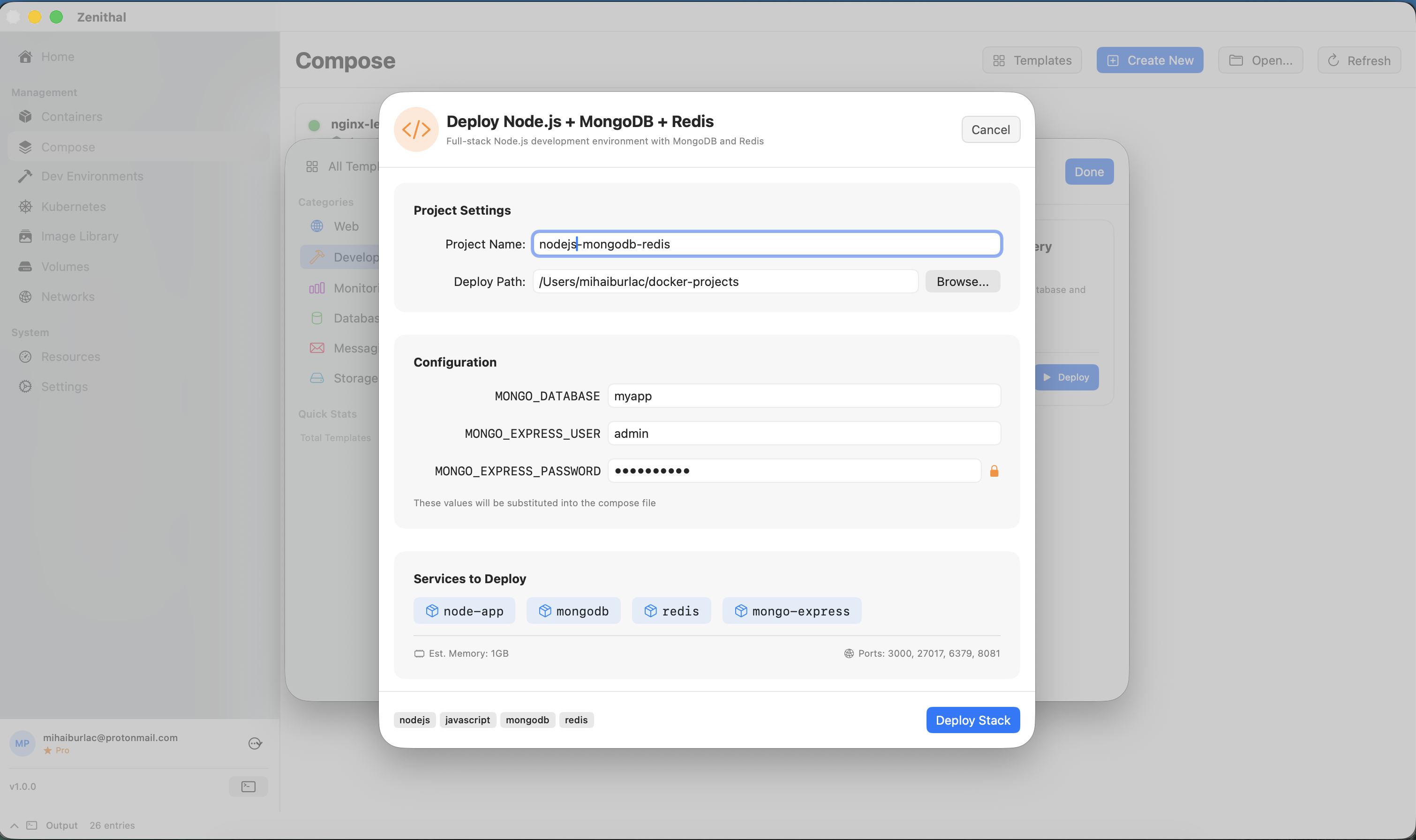
Design multi-service stacks visually - deploy from 65+ templates or build your own without writing YAML.
AI that never leaves your Mac
Powered by Apple's on-device Foundation Models. No API keys, no accounts, no cost - and your code, builds, and scan results never touch a server.
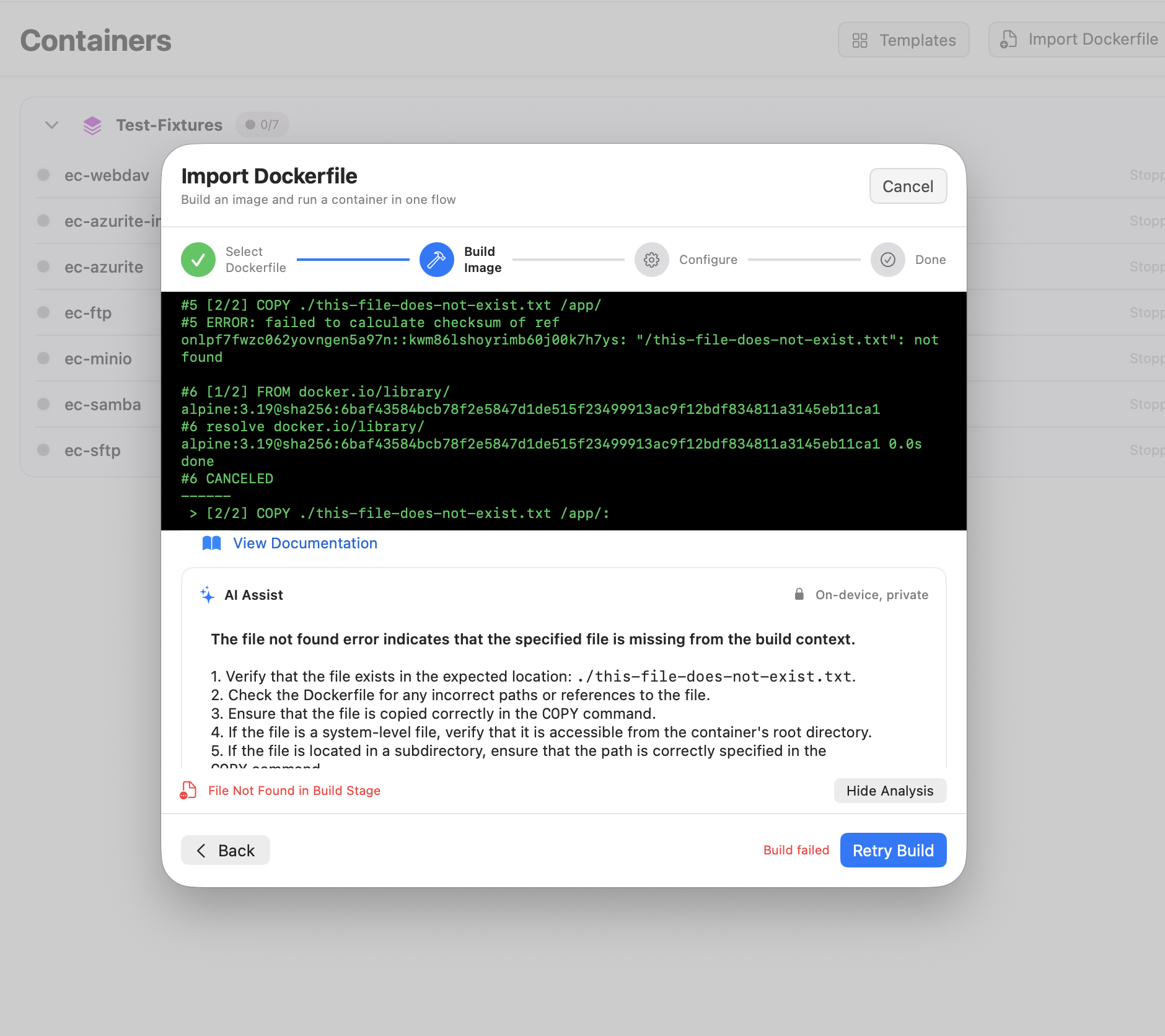
Explain failed builds in plain English
When a Docker build fails in the Import wizard, AI Assist explains what went wrong and how to fix it - layered on top of Zenithal's deterministic suggestions, never replacing them. Missing COPY paths, unresolved base images, dependency errors, non-zero exits.
- Actionable, numbered fix steps
- Reads the real build log, no copy-paste
- Always available heuristics underneath
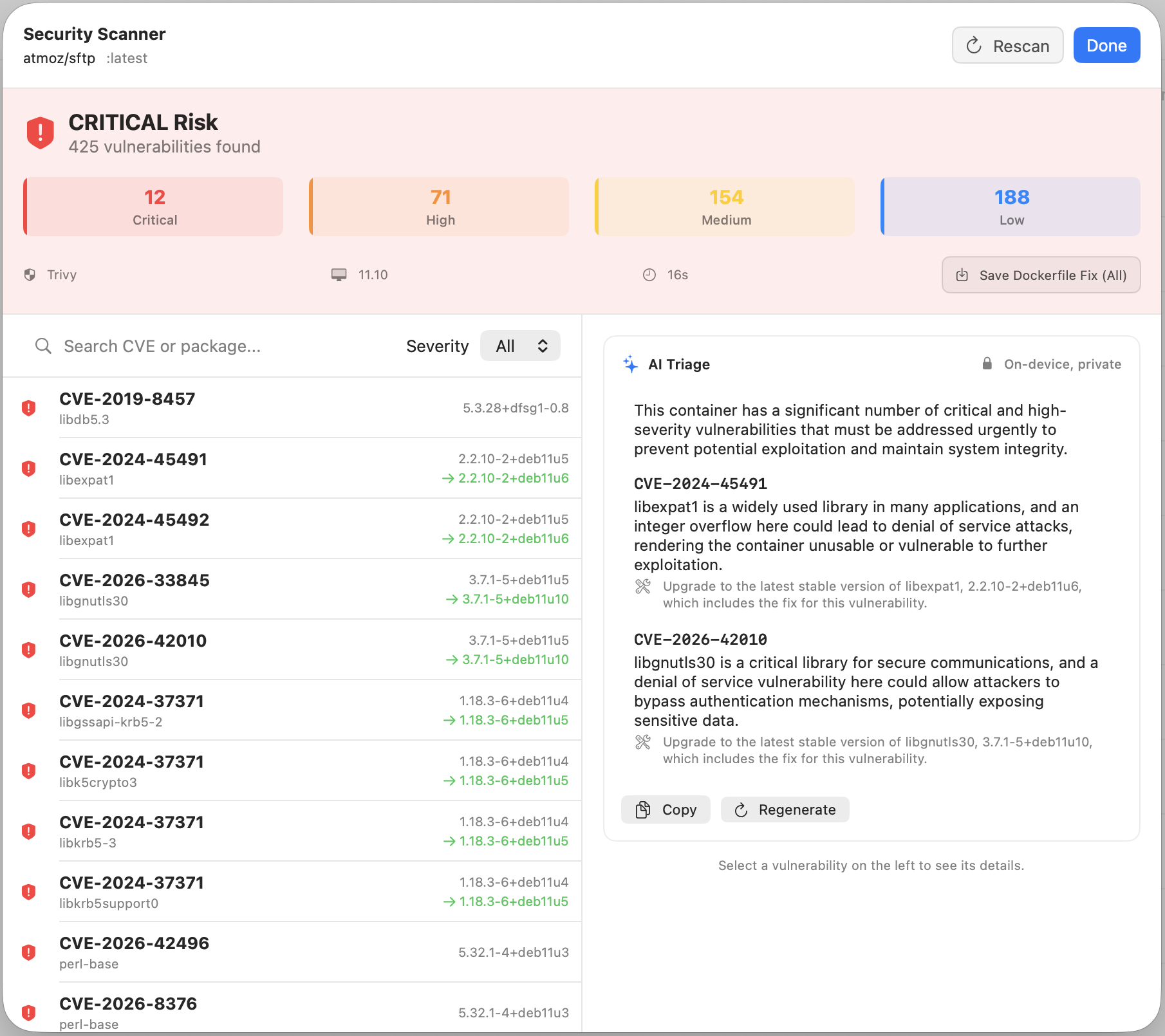
Triage security scans, not just list them
A Trivy or Grype scan can return hundreds of CVEs. AI Triage reads your real scan output and surfaces the handful that actually matter - why each is dangerous and how to remediate - with every cited CVE validated against the scan to block hallucinations.
- Prioritizes critical & high findings
- Remediation guidance per CVE
- Anti-hallucination guard on cited IDs
Requires macOS 26 with Apple Intelligence on Apple Silicon. On earlier macOS the app works exactly as before - AI Assist is simply hidden.
Everything You Need
Comprehensive container management from development to production
Container Dashboard
Real-time container management with intelligent grouping. One-click Start/Stop/Restart, built-in terminal, and performance profiling.
- Live status with health indicators
- Container file browser
- Quick-launch cards
Docker Compose Orchestration
Visual Compose project management with deployment tracking. Pre-deployment validation catches issues before they happen.
- Port conflict detection
- Background deployments
- Version history & rollback
Kubernetes Integration
Full K8s cluster management without leaving your Mac. Bridge the gap between local Docker development and production Kubernetes.
- Smart Compose to K8s migration
- Auto Secrets & ConfigMaps
- Bulk resource cleanup
Security Scanning
Built-in vulnerability scanning powered by Trivy and Grype. Detect, remediate, and export fixes - all from one view.
- CVE detection with CVSS scoring
- 1-click container remediation
- Dockerfile fix export
Smart Logging
Unified log viewer with intelligent aggregation. Debug faster with correlated logs from all sources.
- Multi-source logging
- Advanced filtering
- Export capabilities
Resource Monitoring
Real-time resource usage visualization. Optimize resources and catch issues before they impact performance.
- CPU & memory trends
- Network & Block I/O
- Historical charts
Build Secrets
Pass BuildKit secrets - API keys, tokens, SSH keys - into image builds without baking them into layers. Provide them by value or from a file, straight from the Image Build and Dockerfile Import wizards.
- BuildKit --secret, no layer leakage
- By value or from a file
- Image Build & Dockerfile Import
On-Device AI Assist
Powered by Apple's on-device Foundation Models. Get plain-English explanations of failed Docker builds and AI triage of security scan results - runs entirely on your Mac, zero network, nothing leaves the machine.
- 100% on-device, fully private
- Explains failed Docker builds
- Triages Trivy & Grype scan results
- Requires macOS 26 + Apple Silicon
Zenithal vs Docker Desktop
An honest comparison - including where Docker Desktop wins
Cold startup depends on Lima VM boot. Subsequent launches are near-instant.
Why Zenithal?
Built from the ground up for macOS developers
Instant UI response - native SwiftUI, not a web wrapper
Stop juggling Docker Desktop, kubectl, and Lens
Find and fix vulnerabilities with built-in Trivy & Grype scanning
Design multi-container stacks visually - no YAML required
Simple, Transparent Pricing
Try all features free for 7 days. No credit card required.
Zenithal
7-day free trialOne-time purchase, yours forever
$29.99 one-time
No subscription. No recurring fees.
Start free, buy when you're ready. Use your account email at checkout.
Backed by a 14-day money-back guarantee.
What you get
- Full container management
- Docker Compose orchestration & Builder
- Security scanning (Trivy & Grype)
- Kubernetes management
- Image, volume & network management
- Resource monitoring & profiling
- 65+ templates, 10 registries
- VS Code integration
Watch the Full Demo
Want Zenithal on Windows?
Zenithal is Mac-only today. Know someone who needs it on Windows? Add an email to vote and we'll notify them.
No spam. One email if it ships, nothing otherwise.
Compare & Explore
See how Zenithal compares to other ways of running Docker and Kubernetes on a Mac.