Package Management
Install, update, and manage all your Homebrew packages with a visual interface.
Browsing Packages
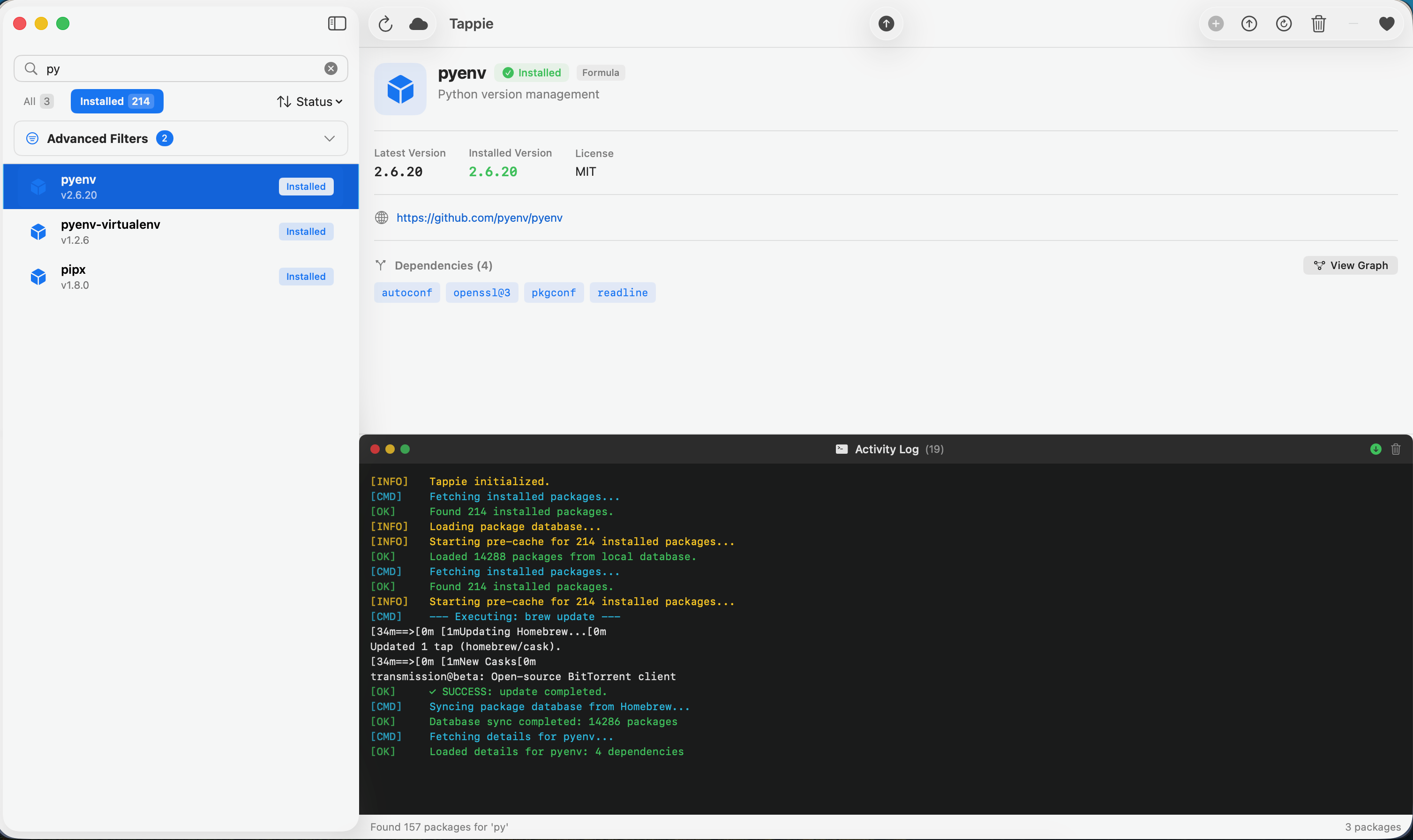
The sidebar displays your packages with visual indicators:
- Blue cube icon - Installed formula
- Gray cube icon - Available formula (not installed)
- Box icon - Cask (GUI application)
- Orange dot - Update available
- Status badge - Shows "Installed", "Available", or "Updatable"
Package Details
Click any package to view its details:
- Name and current version
- Description of what the package does
- License information
- Homepage link
- Dependencies (clickable to navigate)
- Installed version vs. latest available version
Installing a Package
- Search or browse to find the package you want
- Click to select it in the list
- Click the Install button in the toolbar
- Watch the installation progress in the Activity Log
- A toast notification confirms when installation is complete
Note: Dependencies are automatically installed when you install a package.
Updating Packages
Updating a Single Package
- Select a package that shows an update is available (orange dot)
- Click the Upgrade button in the toolbar
- The package will be upgraded to the latest version
Updating All Packages
- Click Upgrade All in the toolbar
- All outdated packages will be upgraded sequentially
- Progress is shown in the Activity Log
Uninstalling a Package
- Select an installed package
- Click the Uninstall button in the toolbar
- Confirm the action in the dialog
- The package will be removed from your system
Warning: Uninstalling a package may affect other packages that depend on it.
Reinstalling a Package
Useful for fixing broken installations:
- Select an installed package
- Click the Reinstall button in the toolbar
- The package will be removed and reinstalled fresh
Formulae vs Casks
Homebrew has two types of packages:
Formulae
Command-line tools and libraries. Examples:
git- Version controlnode- JavaScript runtimepython- Programming language
Casks
GUI applications. Examples:
visual-studio-code- Code editorgoogle-chrome- Web browserspotify- Music streaming
Toolbar Quick Actions
| Button | Description |
|---|---|
| Refresh | Reload the package list from your system |
| Update Homebrew | Fetch latest package information from Homebrew |
| Upgrade All | Upgrade all installed packages with available updates |
| Install | Install the selected package |
| Upgrade | Upgrade the selected package |
| Reinstall | Reinstall the selected package |
| Uninstall | Remove the selected package |