
Private, cross-device note sync
Private, Encrypted Notes That Sync Across Your Devices
Write on your Mac, keep reading on your iPhone, edit on your iPad - your notes follow you without ever passing through our servers. Metis stores your notes as plain Markdown files and syncs them through your own iCloud, and a locked note stays protected by a password only you know. There is no Empiric account for your notes, no third-party sync service, and sync is included in the one-time price.
$19.99 one-time · no subscription · 7-day free trial
Keys never leave your devices
Your notes never touch an Empiric server
One-time, no subscription
How your notes stay private across devices
No Empiric server
Your notes are not uploaded to us and are not stored on our infrastructure. We run no notes server - there is nothing on our side to breach or subpoena.
Synced through your iCloud Drive
Metis uses the iCloud Drive you already have, so notes move between devices over Apple's infrastructure - not a third-party sync service you have to trust or pay separately.
Locked notes, AES-256
Lock a sensitive note and its body is encrypted with AES-256, unlocked only by a password you set. Lock it on your Mac and the same password opens it on your iPhone or iPad - the lock travels with the note.
Mac, iPad, and iPhone
One license covers all three (1 Mac + 1 iPad + 1 iPhone). Start a note on one device and pick it up on the next, no re-import, no copy-paste.
Plain Markdown, no lock-in
Every note is a real .md file you own. If you ever leave, your notes are already in an open format on your own devices - nothing to export, nothing trapped in a proprietary database.
Sync is not a subscription
Cross-device sync is part of the one-time $19.99, not a monthly add-on. Compare that to note apps that charge a recurring fee just to sync.
How sync actually works (the honest version)
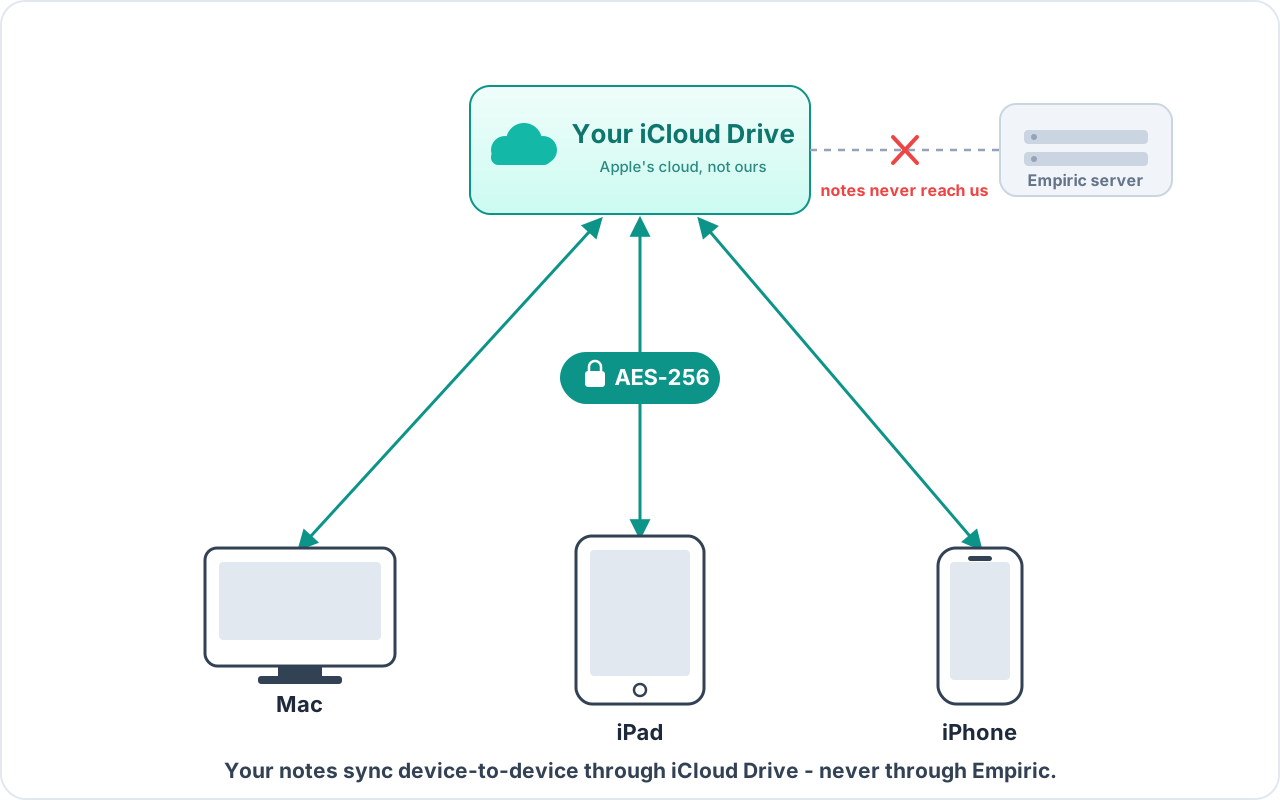
Let's be precise, because 'private sync' gets oversold. Metis does not run its own cloud, and it does not upload your notes to Empiric - we have no content backend at all. Instead it syncs through the iCloud Drive already on your Apple devices. So yes, your notes move over Apple's infrastructure - the same place your other iCloud files already live - and no, they never pass through a server we control.
That distinction is the whole point. There is no Empiric-side database of your notes, no login to our service to read them, and no third-party sync vendor in the middle. The parties involved are you and Apple - not us, and not a sync startup you'd have to trust with your knowledge base.
- No Empiric server holds your notes - we receive nothing
- Sync runs on your own iCloud Drive, not a third-party service
- No account with us is required to sync
What a locked note protects
For notes that need more than file-level privacy, Metis lets you lock a note. Its body is then encrypted with AES-256, and the key that decrypts it is derived from a password only you set - so a locked note is readable only by someone who knows that password. Not Empiric, not Apple, not anyone who gets hold of the file.
The lock is tied to the note, not to a device: lock it on your Mac and it stays locked when it reaches your iPhone or iPad, opening with the same password there. For a locked note, only the encrypted form is ever written to disk or synced through iCloud - the readable text never leaves your device. Your password and its derived key never leave your devices and are never sent to us, so if you forget the password we genuinely cannot recover the note. No escrow, no back door - which is exactly why no one else has one either.
- Locked-note bodies encrypted with AES-256
- Unlock key derived from your password; keys never leave your devices
- Locked notes sync as ciphertext - iCloud only ever holds the encrypted form
This is password-based encryption of individual notes, not a formal end-to-end-encrypted protocol and not full-disk encryption. Notes you have NOT locked are ordinary Markdown files: readable on your device (protected by your device security / FileVault) and stored in plain form in your iCloud like any other file. Lock the notes that need it.
Sync included vs paying every month
Cross-device sync is one of the most common reasons people pay a monthly fee for a notes app - the app is free, then sync is the upsell. Metis includes sync in the one-time $19.99. One purchase covers your Mac, iPad, and iPhone, and there is no recurring charge to keep your notes in step across them.
If you are coming from a subscription notes app specifically to stop paying monthly for sync, this is the page that matters: you buy once, you sync forever, on infrastructure you already own.
Frequently Asked Questions
Does Metis use its own cloud or servers to sync?
No. Metis has no notes server and no content backend. It syncs through the iCloud Drive already on your Apple devices, so your notes move over Apple's infrastructure and never pass through an Empiric-controlled server.
Do I need an Empiric account to sync my notes?
No. Sync runs on your own iCloud Drive. You do not log in to an Empiric service for your notes to move between devices.
What encryption does Metis use for locked notes?
A locked note's body is encrypted with AES-256, and the key that decrypts it is derived from a password you set. Because that key is derived from your password and never leaves your devices, only someone with the password can read the note - not Empiric and not Apple. Notes you have not locked are stored as plain Markdown files.
How is a locked note protected across devices?
The encryption is tied to the note, not the device, so the same password unlocks it everywhere. Lock it on your Mac and it stays locked - openable with the same password - on your iPhone and iPad. (Optional biometric unlock like Touch or Face ID is a per-device convenience you turn on once per device; the password is what travels.)
What happens if I forget my note password?
We cannot recover it. Because the password is yours alone, there is no back door - which is the same reason no one else can open your locked note either. Keep the password somewhere safe.
Does syncing cost extra?
No. Sync is included in the one-time $19.99 and covers 1 Mac + 1 iPad + 1 iPhone. There is no monthly sync subscription.
Can I use Metis without iCloud?
Yes. Your notes are local Markdown files, so Metis works fully on a single device without iCloud - a local vault is fully functional offline. Cross-device sync is the only part that uses iCloud Drive; turn it off and everything else still works.