Zenithal
LocalStack alternative for Mac: free local AWS with no auth token
Short answer: since March 23, 2026, the latest LocalStack releases need a LocalStack account and an auth token, in CI too. Floci is a free, MIT-licensed AWS emulator that answers on the same port, 4566, accepts any credentials and needs no account. It runs natively on Apple Silicon.
If your local AWS setup stopped working this year, you're not imagining it. LocalStack's announcement moved its AWS emulator to a single image: from March 23, 2026, the latest releases require a LocalStack for AWS account and an auth token, including in CI. A free plan still exists for hobbyists and individual developers, but it needs the token too. Pinning an older community tag works for a while, at the cost of updates and security fixes. For many teams that means a signup, a secret for every developer and pipeline, and a plan decision, just to keep running a local S3.
This guide sets up a free alternative on the command line first, then shows the same thing in one click with Zenithal.
What Floci is
Floci is an open-source local AWS emulator released under the MIT license. It ships as one Docker image, floci/floci, with native amd64 and arm64 builds, so it runs at full speed on M-series Macs with no Rosetta. What matters for a LocalStack user:
- Same endpoint. All services answer on
http://localhost:4566. - No auth token. Any non-empty access key and secret work.
- Standard clients. The AWS CLI and SDKs, Terraform, CDK and OpenTofu work when you point them at the endpoint.
- Real containers where it matters. Lambda, RDS, ECS and ElastiCache run real containers, so they need the Docker socket.
- A dashboard.
http://localhost:4566shows a status page with your endpoint and copyable exports. The full Floci UI at/_floci/uiruns as a separate container and also needs the Docker socket.
This guide uses version 2.4.0 (release notes). Pin a tag rather than latest, so your setup doesn't change under you.
Run Floci from the command line
You need a Docker engine on your Mac: Docker Desktop, Colima, OrbStack or Zenithal all work. Start Floci:
docker run -d --name floci -p 4566:4566 floci/floci:2.4.0Check that it answers:
curl -s -o /dev/null -w "%{http_code}\n" http://localhost:4566200Point the AWS CLI at it
The AWS CLI v2 and current SDKs (boto3, JavaScript v3, Go v2, Java 2.x and more) read AWS_ENDPOINT_URL, so a few environment variables replace every --endpoint-url flag:
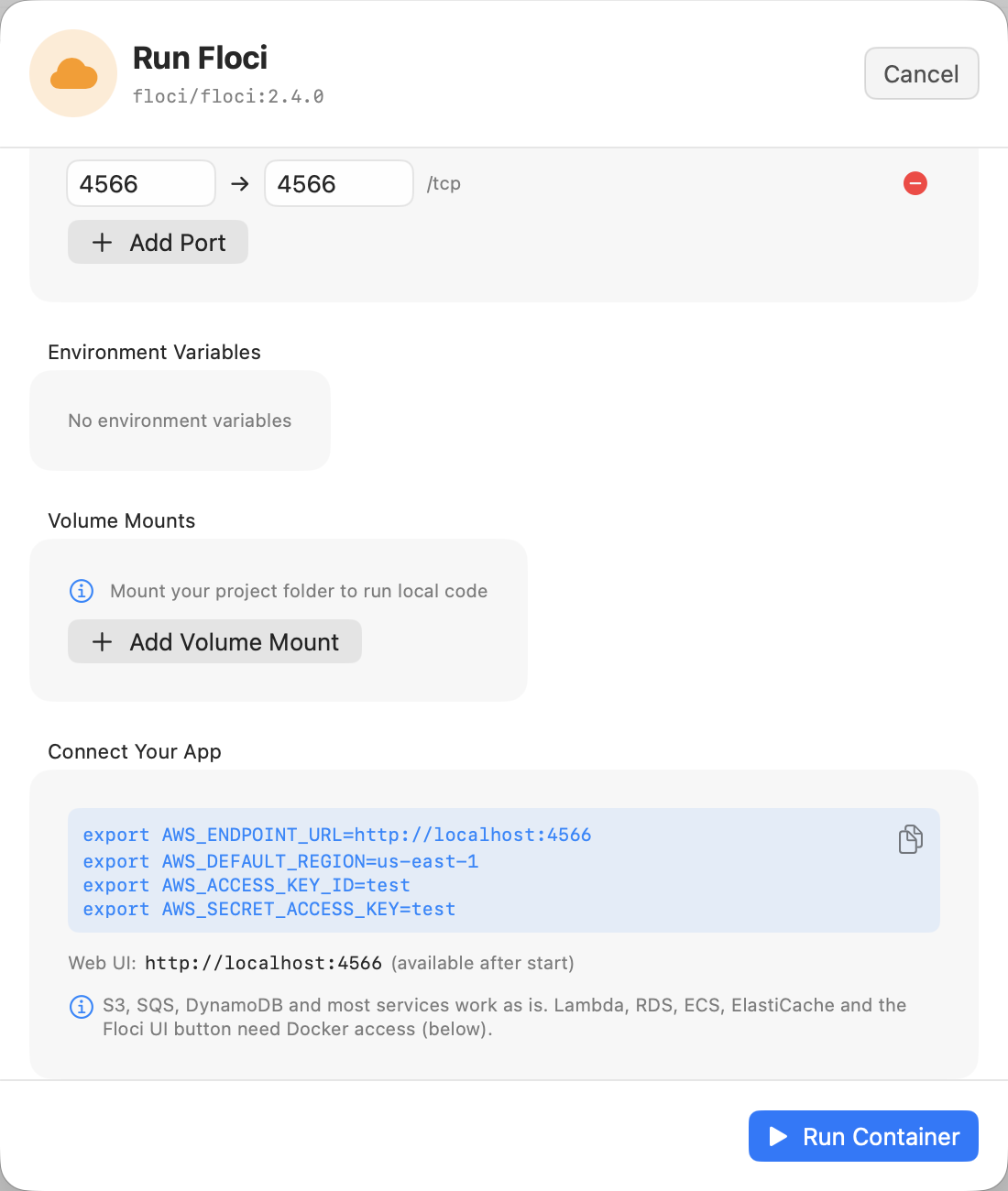
export AWS_ENDPOINT_URL=http://localhost:4566
export AWS_DEFAULT_REGION=us-east-1
export AWS_ACCESS_KEY_ID=test
export AWS_SECRET_ACCESS_KEY=test
The credentials are placeholders. Floci accepts any non-empty values.
Try S3
aws s3 mb s3://demo-bucketmake_bucket: demo-bucketecho "hello from floci" | aws s3 cp - s3://demo-bucket/hello.txt
aws s3 ls s3://demo-bucket2026-11-05 12:07:55 17 hello.txtaws s3 cp s3://demo-bucket/hello.txt -hello from flociTry SQS and DynamoDB
aws sqs create-queue --queue-name demo-queue{
"QueueUrl": "http://localhost:4566/000000000000/demo-queue"
}aws dynamodb create-table --table-name demo \
--attribute-definitions AttributeName=id,AttributeType=S \
--key-schema AttributeName=id,KeyType=HASH \
--billing-mode PAY_PER_REQUEST \
--query TableDescription.TableStatus"ACTIVE"aws dynamodb list-tables{
"TableNames": [
"demo"
]
}Your application code works the same way: the SDK picks up AWS_ENDPOINT_URL from the environment, so the code itself needs no changes.
Services that run containers (Lambda, RDS, ECS)
Some services start real containers: a Lambda runtime, a Postgres for RDS, Valkey for ElastiCache. For these, Floci needs the Docker socket. Mount it and run Floci as root:
docker rm -f floci
docker run -d --name floci -p 4566:4566 \
  -v /var/run/docker.sock:/var/run/docker.sock \
  -u root \
  floci/floci:2.4.0
This works as written on Docker Desktop, OrbStack and Colima. A rootless engine, such as Lima's default Docker template, is different: the root-owned /var/run/docker.sock refuses rootless containers with Permission denied. Mount the engine's own socket instead, for example /run/user/$(id -u)/docker.sock inside the Lima VM.
The one-click way: Zenithal
Zenithal is a native macOS app for Docker containers, Compose and Kubernetes. It runs Docker in its own lightweight Lima VM, which it creates and manages, so you need neither Docker Desktop nor Colima (Lima itself comes with the Homebrew cask, or brew install lima). Version 2.3 adds an Emulators category to its container templates, with Floci first.
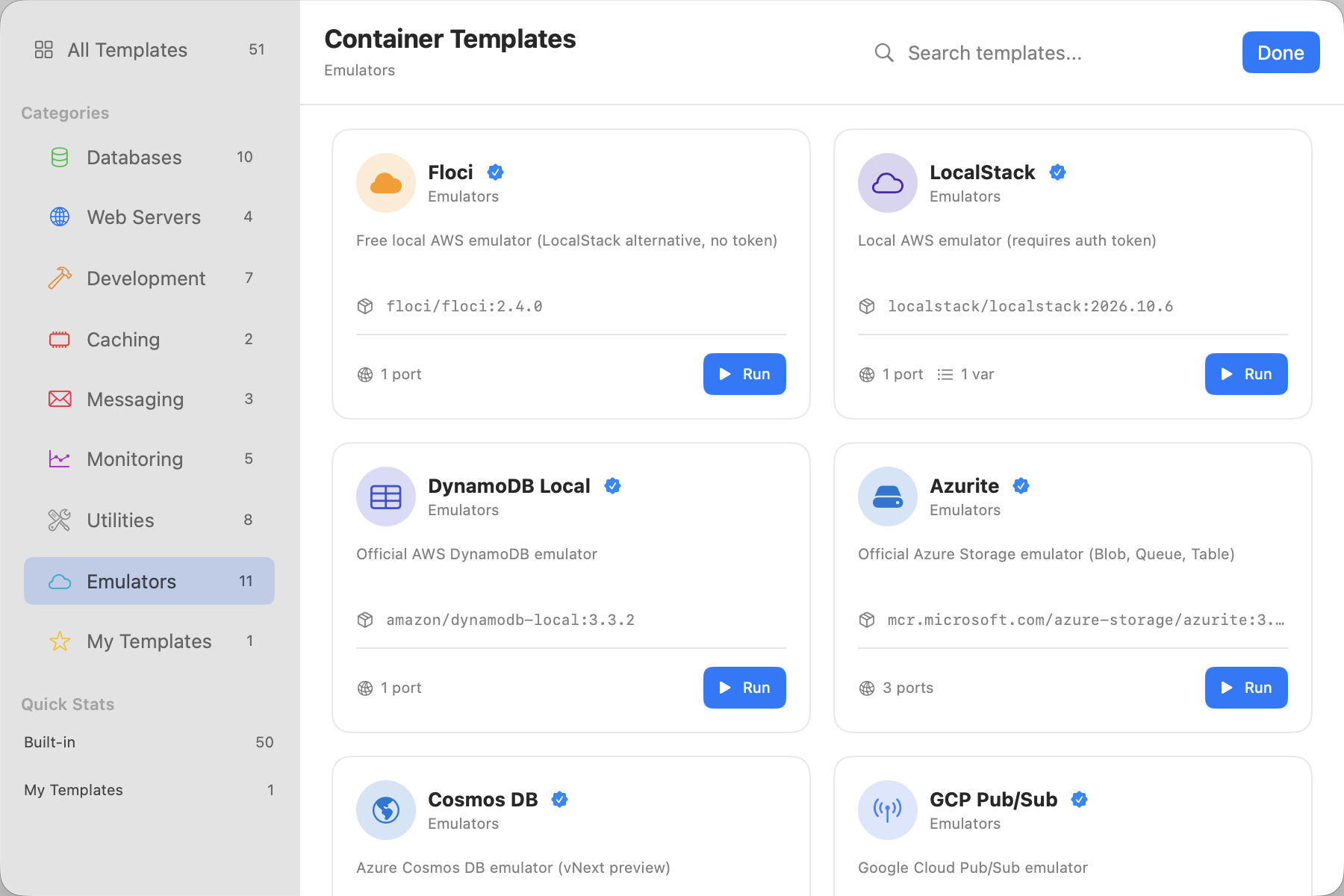
- Open Containers, click Templates and choose Emulators.
- Click Run on the Floci card.
- The run sheet shows a Connect Your App box with the exact
exportlines for your shell. Change the host port and the lines follow it. - For Lambda, RDS, ECS, ElastiCache or the full Floci UI, turn on Docker access in the same sheet. Zenithal mounts the right socket for its engine.
- Copy the lines, click Run Container, and paste them into your terminal.
The Emulators category covers the other clouds too, each with its own connection lines. Every emulator image is pinned to a tested version.
| Template | Emulates | Variables |
|---|---|---|
| Floci | AWS, no token | AWS_ENDPOINT_URL, region, test credentials |
| LocalStack | AWS (needs your auth token) | AWS_ENDPOINT_URL, region, test credentials |
| DynamoDB Local | Amazon DynamoDB | AWS_ENDPOINT_URL_DYNAMODB, region, test credentials |
| Azurite | Azure Blob, Queue, Table | AZURE_STORAGE_CONNECTION_STRING |
| Cosmos DB | Azure Cosmos DB (vNext preview) | COSMOS_ENDPOINT |
| GCP Pub/Sub | Google Cloud Pub/Sub | PUBSUB_EMULATOR_HOST, PUBSUB_PROJECT_ID |
| GCP Firestore | Google Cloud Firestore | FIRESTORE_EMULATOR_HOST, GOOGLE_CLOUD_PROJECT |
| GCP Spanner | Google Cloud Spanner | SPANNER_EMULATOR_HOST |
| Fake GCS | Google Cloud Storage | STORAGE_EMULATOR_HOST |
| Firebase | Auth, Firestore, Realtime Database, Storage, Pub/Sub | FIREBASE_AUTH_EMULATOR_HOST, FIRESTORE_EMULATOR_HOST, FIREBASE_DATABASE_EMULATOR_HOST, FIREBASE_STORAGE_EMULATOR_HOST, PUBSUB_EMULATOR_HOST, GCLOUD_PROJECT |
| Mailpit | SMTP with a web inbox | SMTP_HOST, SMTP_PORT |
Floci or LocalStack?
Choose Floci when you want local AWS with no account, no token and nothing to distribute to CI: personal projects, open-source repos, and teams that don't want another vendor login.
Stay on LocalStack when you rely on features Floci doesn't cover yet, or when your team already pays for it and has tokens set up. Zenithal has a LocalStack template too, with a field for LOCALSTACK_AUTH_TOKEN.
Both listen on port 4566, so run one at a time, or move one of them to another host port.
FAQ
Is Floci a drop-in replacement for LocalStack?
For most local workflows, yes. It uses the same port (4566), accepts any credentials, and works with standard AWS clients. Coverage differs by service, and a few services are stubs, so check the Floci README for the services your project uses.
Does Floci need an account or an auth token?
No. It is MIT-licensed and runs with no signup. Any non-empty access key and secret work.
Does it run natively on Apple Silicon?
Yes. The floci/floci image ships native arm64 builds next to amd64.
Can I use it in CI?
The same docker run command works in any CI runner with Docker. There is no token to store as a secret.
Why does Lambda or RDS fail with "Permission denied"?
Those services start containers through the Docker socket. Mount the socket that belongs to your engine and run Floci with -u root. On rootless engines, /var/run/docker.sock is not the right socket. In Zenithal, turn on Docker access in the run sheet and it mounts the right one.
Do I need Docker Desktop?
No. Floci runs on any Docker engine. Zenithal runs Docker in its own Lima VM, so you need neither Docker Desktop nor Colima.
See also: how to run Docker without Docker Desktop and all Docker Desktop alternatives for Mac.