Zenithal Features
Everything you can do with Zenithal, the native macOS Docker and Kubernetes management app.
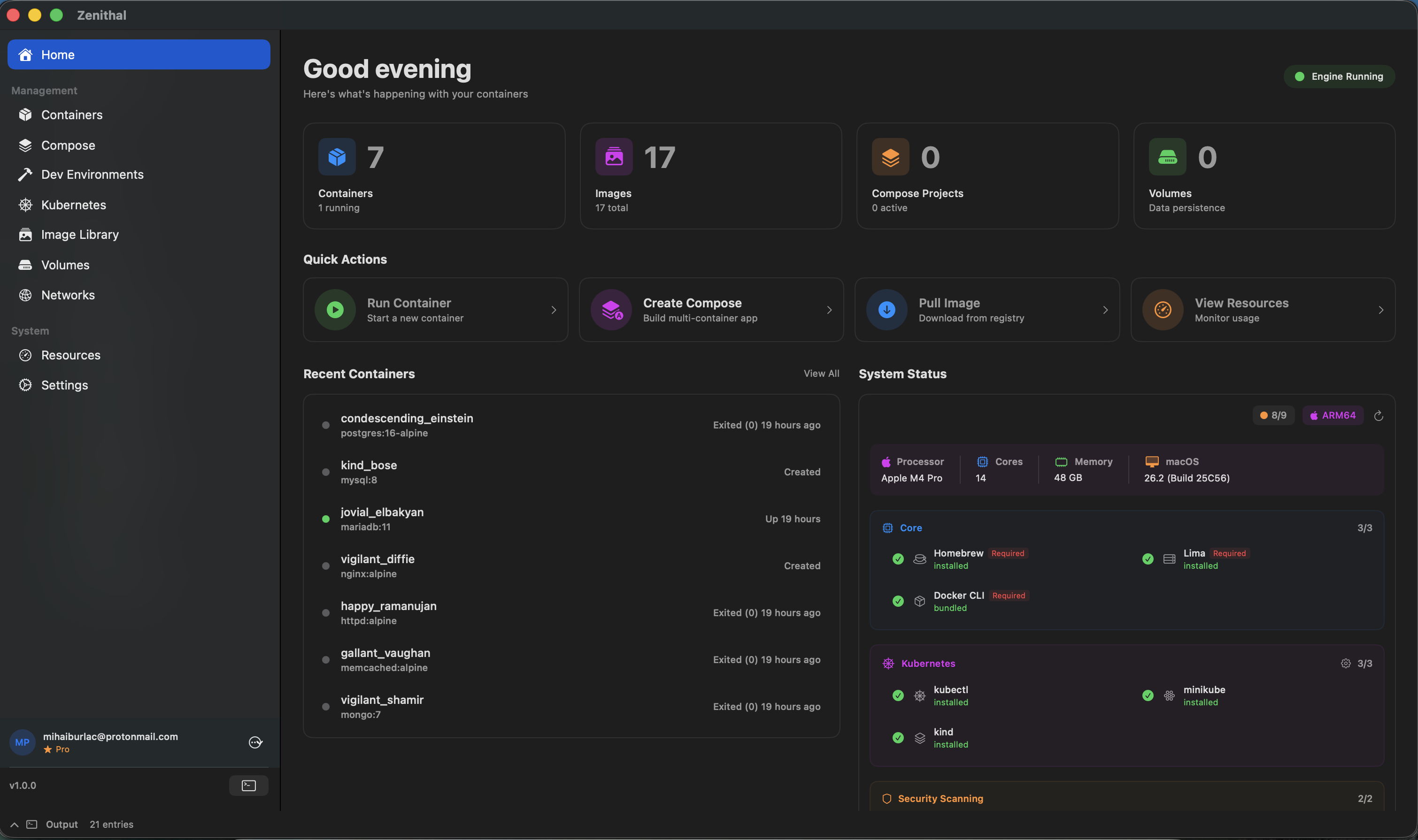
Container Management
Complete control over your Docker containers
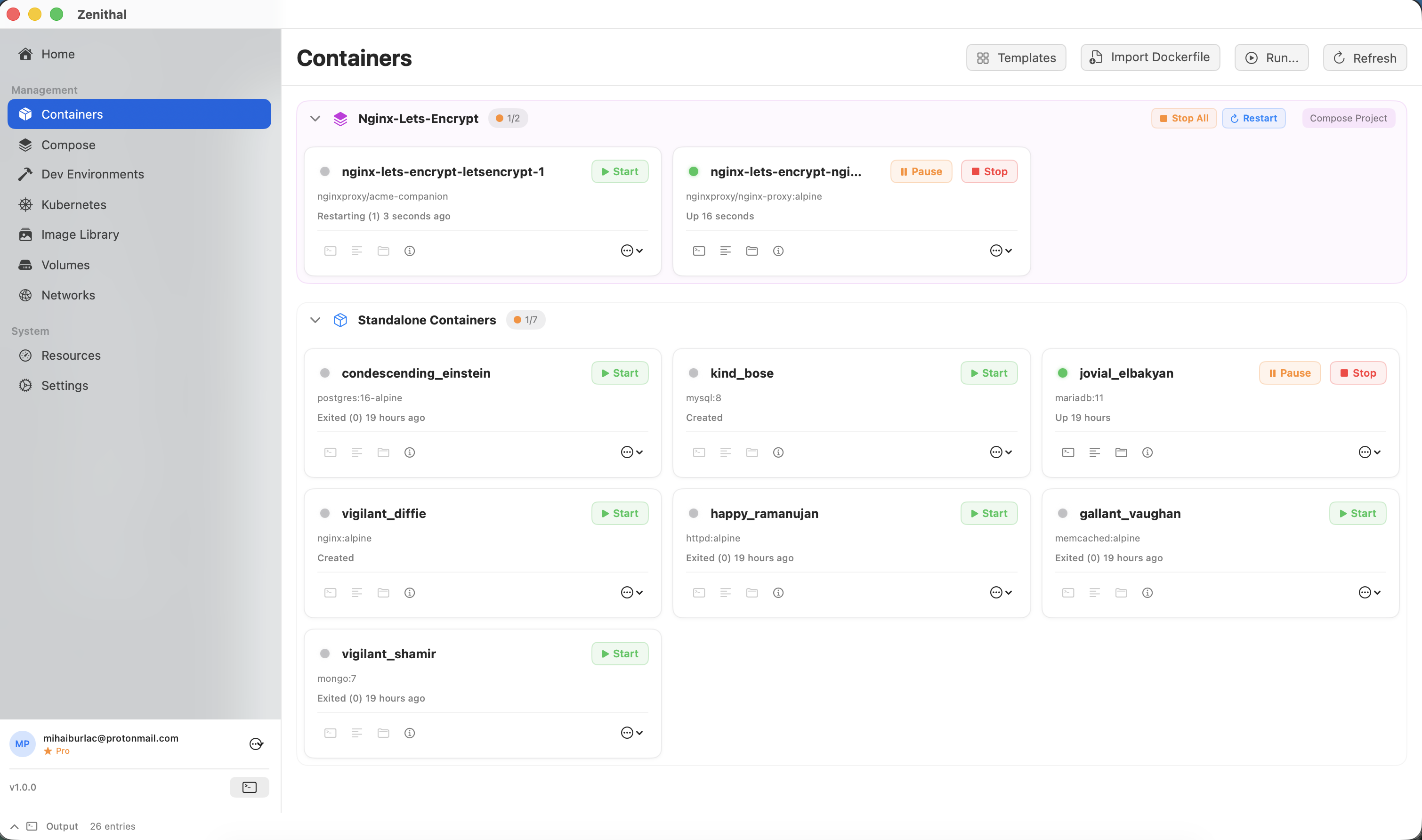
Container Dashboard
View all your containers in a clear dashboard. See status, ports, resource usage, and uptime at a glance with real-time updates.
One-Click Operations
Start, stop, restart, pause, and remove containers with a single click. No command line required.
Smart Command Sanitization
Intelligent input sanitization prevents accidental command injection. Safely enter Docker commands without worrying about shell escaping.
Auto-Populated Env Vars
Database images automatically get pre-filled environment variables (root passwords, default databases). No more looking up required env vars.
Real-time Logs
Stream container logs in real-time with syntax highlighting, search, and filtering. Follow mode auto-scrolls to latest entries.
Container Shell
Open an interactive shell directly into any running container. Execute commands without leaving the app.
Image Management
Manage your Docker images efficiently
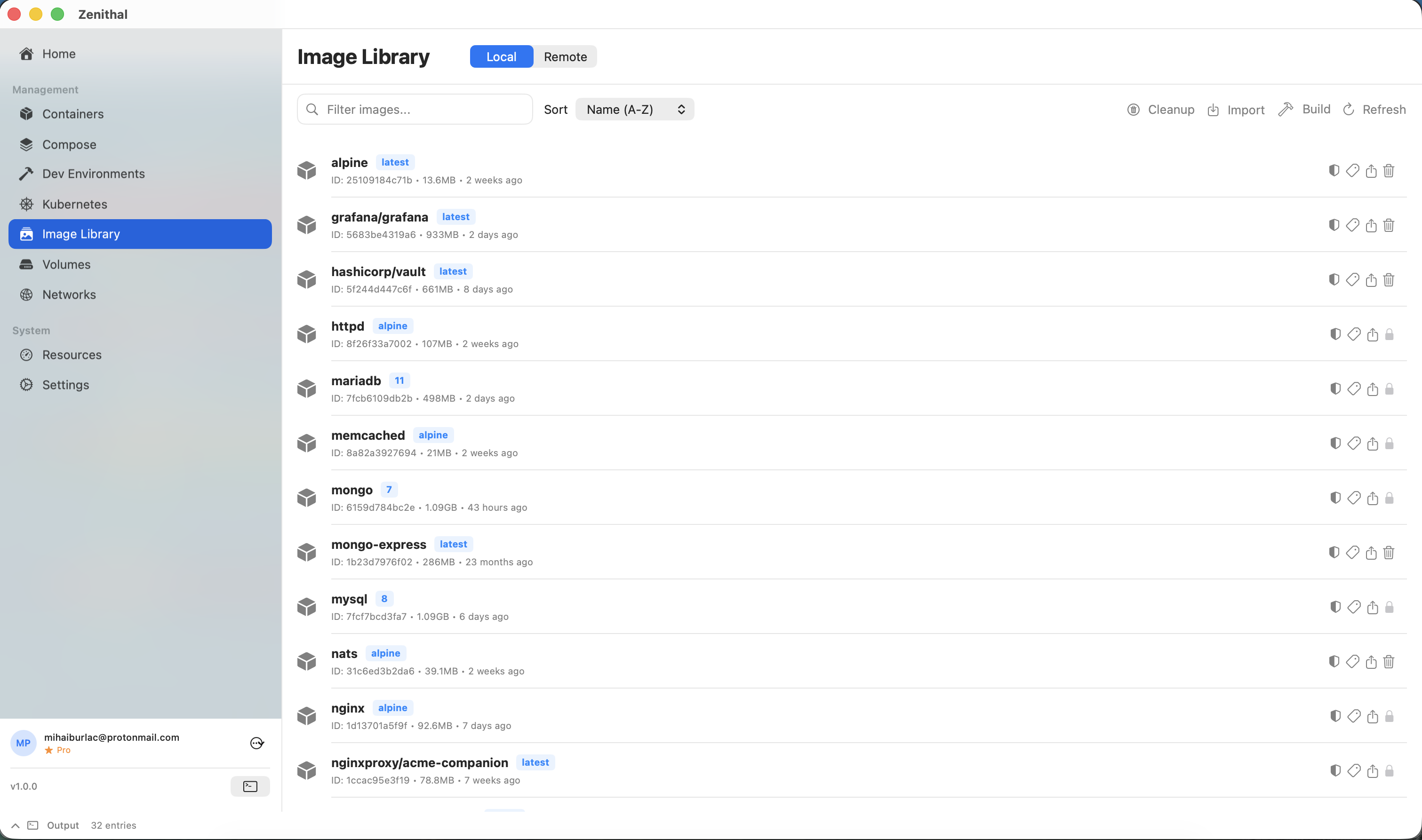
Image Browser
Browse all local images with size, tags, and creation date. Search and filter to find exactly what you need.
Pull & Push
Pull images from Docker Hub or private registries. Push your images with progress tracking.
Image Inspection
View detailed image information including layers, environment variables, exposed ports, and entry points.
Cleanup Tools
Remove unused images, dangling images, and free up disk space with intelligent cleanup suggestions.
Image Import
Import Docker images from .tar, .tar.gz, and .tgz archives. Load images from backups or offline transfers.
Build Secrets
Pass secrets securely during image builds via BuildKit. Support for both file-based and environment variable secrets.
Multi-Architecture Builds
Build images for ARM64, AMD64, and ARM/v7 architectures. Create multi-platform images from a single Dockerfile.
Generate Dockerfile
Generate a Dockerfile from any running container. Reverse-engineer container configurations into reproducible builds.
Dockerfile Import Wizard
Import and parse existing Dockerfiles with a visual wizard. Review build steps and customize before building.
Docker Compose
Orchestrate multi-container applications
Project Management
View and manage all your Compose projects. See service status, scale counts, and quick actions.
Visual Editor
Edit docker-compose.yml files with syntax highlighting, validation, and auto-completion.
Service Control
Start, stop, and restart individual services or entire stacks. Scale services up or down instantly.
Environment Management
Manage environment variables and .env files. Switch between development and production configs easily.
Startup Script Support
Configure startup scripts in Compose Builder services. Run initialization commands before your application starts.
Smart YAML Generation
Compose Builder generates clean, optimized YAML with intelligent defaults and best practices built in.
65+ Compose Templates
Deploy popular stacks instantly with 65+ pre-built templates. From LAMP and MEAN to monitoring stacks and CI/CD pipelines.
Kubernetes Integration
Native Kubernetes cluster management
Cluster Dashboard
Connect to local or remote Kubernetes clusters. View nodes, pods, services, and deployments in one place.
Pod Management
View pod status, logs, and events. Execute commands in pods and manage container lifecycles.
Resource Browser
Browse all Kubernetes resources including ConfigMaps, Secrets, Ingresses, and PersistentVolumes.
YAML Editor
Edit Kubernetes manifests with syntax highlighting, validation, and apply changes directly to the cluster.
Monitoring & Stats
Real-time resource monitoring
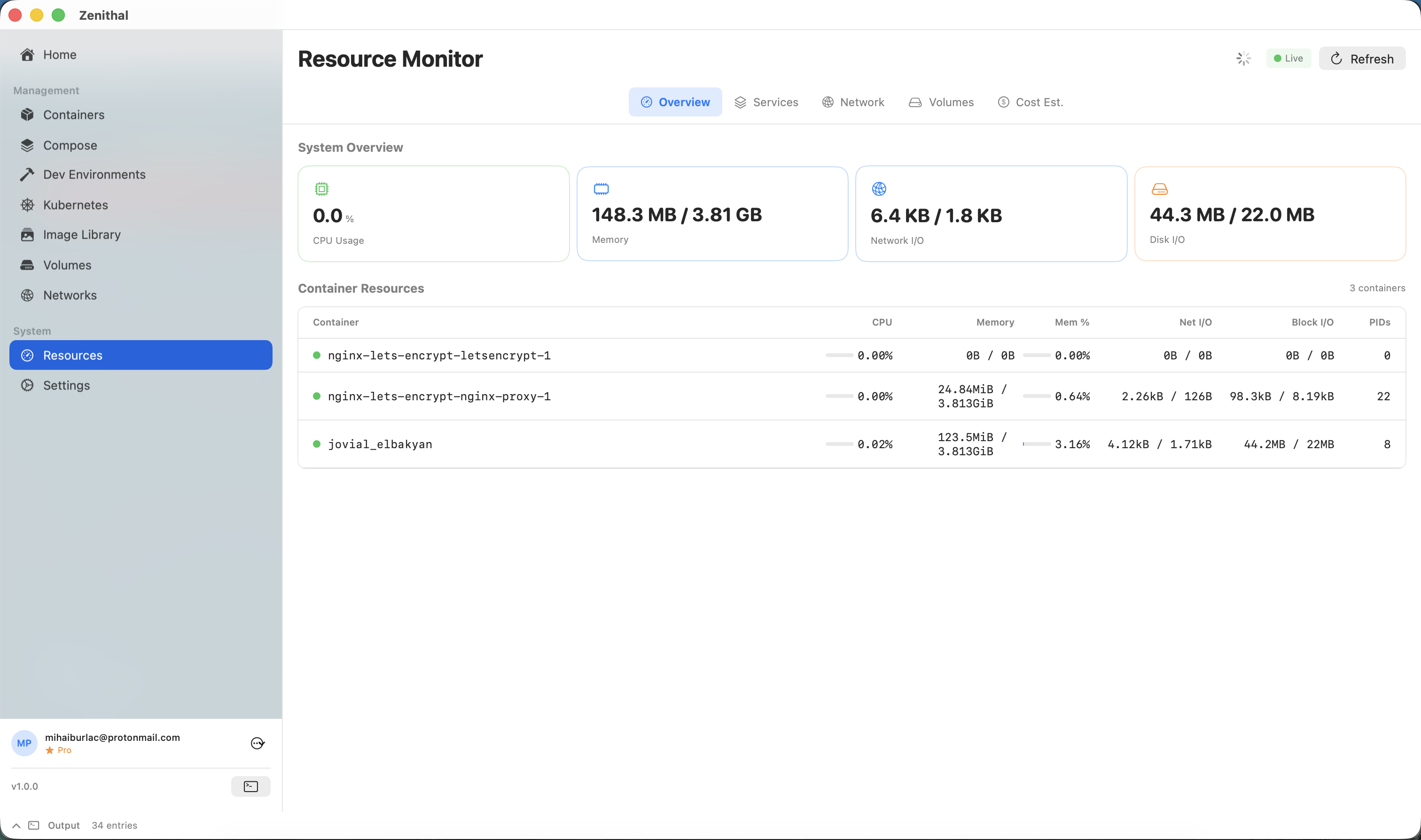
Resource Graphs
Live CPU, memory, network, and disk I/O graphs for containers and the Docker host.
Performance Alerts
Set thresholds for resource usage and get notified when containers exceed limits.
Historical Data
View resource usage history to identify trends and optimize container configurations.
Performance Profiler
Deep-dive CPU, memory, and I/O analysis for individual containers. Identify bottlenecks and optimize resource allocation.
Resource Monitor Pro
Advanced monitoring with cost estimation based on cloud provider pricing. Track resource usage trends and optimize spending.
System Overview
Dashboard showing Docker daemon status, disk usage, container counts, and system health.
Security Scanning
Built-in vulnerability detection and remediation
Trivy & Grype Integration
Scan images for vulnerabilities using Trivy or Grype. View CVEs, severity levels, CVSS scores, and links to security advisories.
Container Remediation
Run fix commands directly in running containers with automatic OS detection and cross-distro package name translation (e.g., Debian xz-utils → Alpine xz).
Dockerfile Export
Export Dockerfile patches that fix a single CVE or all vulnerabilities at once. Copy generated RUN commands into your Dockerfile to make fixes permanent.
Base Image Layer Warnings
Identifies when vulnerabilities are in compiled binaries rather than system packages, meaning they require a base image rebuild instead of a package update.
Activity Log
Complete audit trail of all operations
Real-time Events
Stream Docker events as they happen. See container starts, stops, and all API calls.
Command History
View the equivalent Docker CLI commands for all operations. Great for learning and scripting.
Filtering & Search
Filter events by type, container, or time range. Search through history to find specific operations.
Export Logs
Export activity logs for debugging or compliance. Multiple formats supported.
File Transfer
Transfer files between your Mac and containers with drag-and-drop. Upload and download files without using the command line.
Health Check Configuration
Configure container health checks visually. Set check intervals, timeouts, retries, and start periods with a guided interface.
Port Conflict Auto-Fix
Automatically detect and resolve port conflicts. Zenithal suggests available ports when your desired port is already in use.
Multiple Registries
Connect up to 10 container registries simultaneously. Pull and push images across Docker Hub, GitHub Container Registry, and private registries.
On-Device AI Assist
Private, on-device AI powered by Apple Foundation Models (macOS 26, Pro)
Explain Build Errors
When a Docker build fails in the Import wizard, AI Assist explains what went wrong in plain English with actionable fix steps - layered on top of the deterministic suggestions, never replacing them.
AI Triage of Security Scans
Turn a Trivy or Grype scan of hundreds of CVEs into the handful that matter most, with remediation guidance and an anti-hallucination guard that validates every cited CVE against the real scan.
100% On-Device & Private
Runs entirely on your Mac via Apple's Foundation Models - zero network, no API keys, no cost, nothing leaves the machine. Requires macOS 26 with Apple Intelligence on Apple Silicon; on earlier macOS the app is unchanged.
Dev Environments
Isolated development environments for rapid prototyping
Git Clone
Clone repositories directly into containerized dev environments. Start coding immediately without local setup.
VS Code Integration
Open containers directly in VS Code with the Dev Containers extension. Seamless editor-to-container workflow.
Keyboard Shortcuts
Speed up your workflow with these shortcuts
| Action | Shortcut |
|---|---|
| Check for Updates | Cmd+U |
| Open Help | Cmd+? |
| Settings | Cmd+, |
| Close Window | Cmd+W |
| Quit | Cmd+Q |
| Close Dialogs | Escape |
Accessibility
Designed with accessibility in mind
VoiceOver Support
- All buttons have descriptive labels
- Container rows announce name, status, ports
- Toolbar buttons explain function and state
Visual Design
- High contrast status indicators
- Color + icons for all status states
- Resizable panels with minimum constraints