Auto-Organize for macOS
Automatically organize files on your Mac
A folder full of mixed downloads, documents, and code is one click away from tidy. EmpiricCommander's Auto-Organize sorts files into a clean structure - by type, by date, or rules you set - and shows you the exact new layout before a single file moves.
$49.99 one-time · no subscription · macOS, iPad & iPhone
By type, month, year, and more
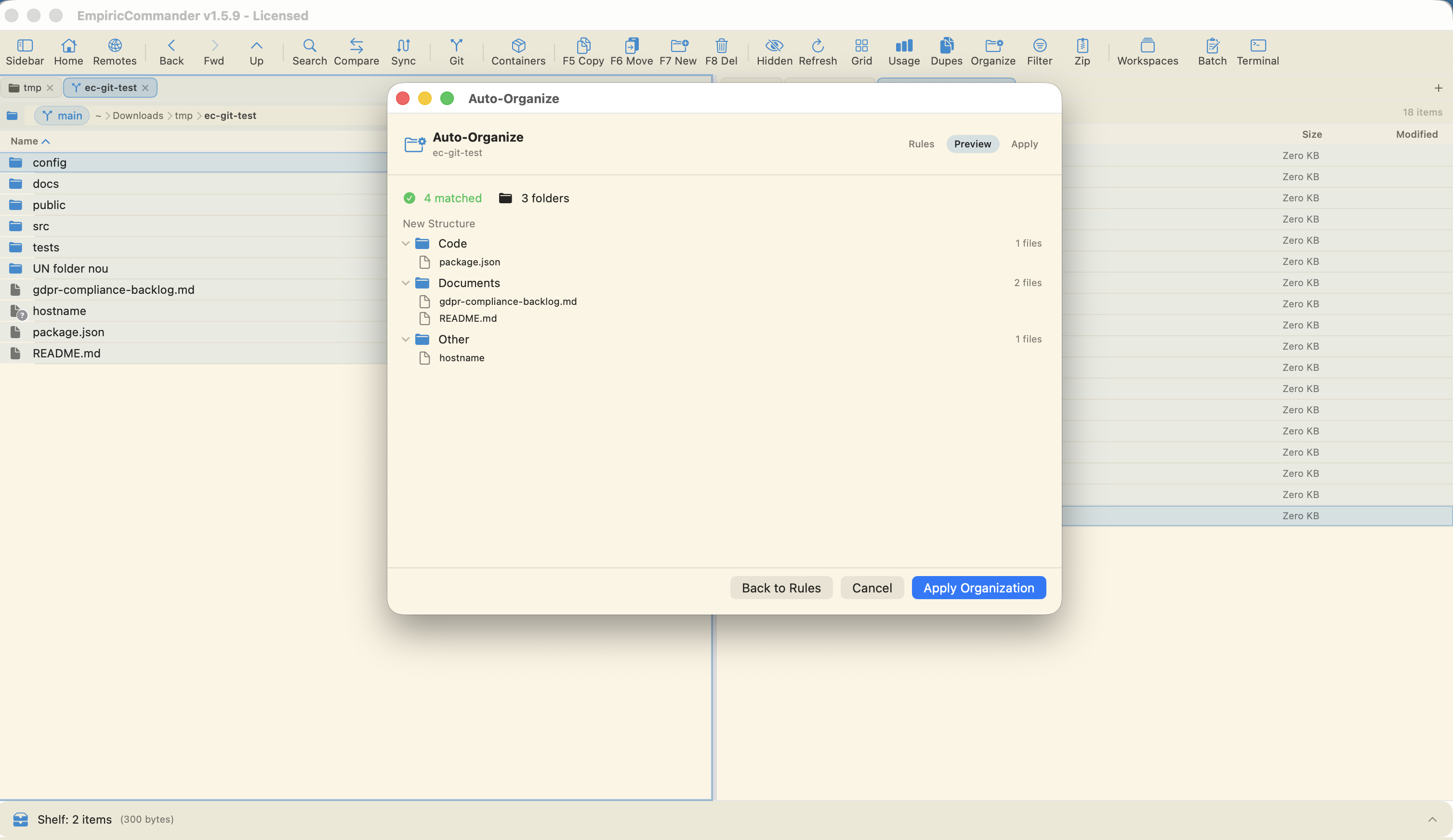
See the new structure, then apply
Safe conflict handling
How Auto-Organize works for you
One-click templates
Start from By Month, By Year, By Type, Type + Date, Downloads, or Code Project - then tweak if you want.
Sort by type
Group files into folders like Code, Documents, and Other based on what they are, automatically.
Sort by date
Organize into year or month folders when chronology matters more than file type.
Your own rules
Build custom rules with a destination pattern like {category}, stack multiple rules, and include subfolders.
Preview before applying
See the full proposed structure and how many files match before anything is touched.
Safe by default
Move or copy, keep both on name conflicts (rename), and send anything that does not match to an Other folder.
Pick a rule, preview, apply
Choose a template or build your own rules, hit preview, and EmpiricCommander shows the exact folders it will create and which files land where - for example Code, Documents, and Other, with a count of what matched.
Only when the preview looks right do you apply. Nothing is moved or copied until then, so there is no undo scramble.
Rules and safety
Each rule has a destination pattern (such as {category}) and you can include subfolders. Choose whether Auto-Organize moves or copies, how it handles name conflicts (keep both with a rename), and where unmatched files go (an Other folder by default).
Frequently Asked Questions
How do I automatically organize files on Mac?
In EmpiricCommander, open Auto-Organize, pick a template (by type, month, year, and more) or set your own rules, preview the proposed structure, and apply. Files are sorted into folders for you.
Can I preview before it moves my files?
Yes. Auto-Organize shows the full new folder structure and the number of matched files before anything moves. Nothing is touched until you apply.
Can I organize by file type or by date?
Both. Templates include By Type (Code, Documents, Other) and date-based options (By Month, By Year, Type + Date), and you can combine or customize rules.
What happens to files with the same name?
You choose. The default conflict handling keeps both by renaming, and files that match no rule are moved to an Other folder.