Container file browsing for macOS
Browse Docker container files on your Mac
Need to see what is actually inside a running container? EmpiricCommander opens a Docker, Lima, or Colima container's filesystem in a real file-manager tab - browse it like any folder, side by side with your local files. No docker exec, no docker cp, no guessing at paths.
$49.99 one-time · no subscription · macOS, iPad & iPhone
Sockets detected for you
Pick it from a toolbar menu
In the two panes
What you can do
Auto-discovery
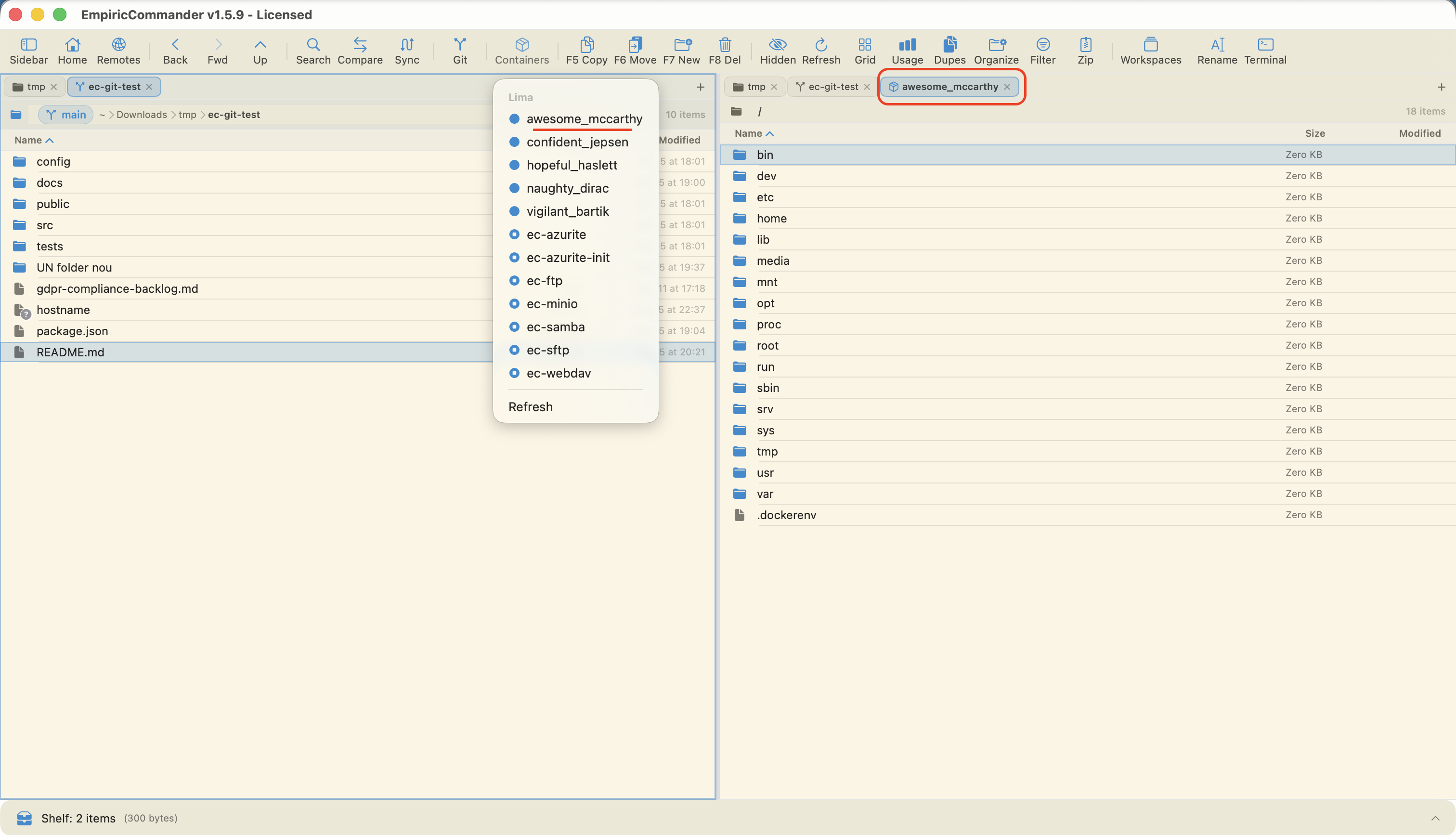
EmpiricCommander finds Docker Desktop, Colima, and every Lima instance automatically and lists their running containers in a toolbar menu - nothing to configure.
Open a container in a tab
Click any running container to open a tab at its filesystem root, then navigate it like a normal folder tree.
Container next to local
Put a container in one pane and a local folder in the other, so you can see config, logs, and app files in context.
No CLI gymnastics
Skip the docker exec and docker cp dance just to read a file. Browse visually instead.
Quick Look inside containers
Preview files in a container with Quick Look the same way you would locally.
Works with your setup
Whether you run Docker Desktop, Colima, or Lima directly, EmpiricCommander reads the sockets you already have.
Why browse container files in a file manager
When something is wrong inside a container, the usual answer is a string of docker exec and docker cp commands - and a lot of guessing at where files live. A file manager turns that into pointing and clicking: open the container, walk the tree, find the config that is not what you expected.
Because EmpiricCommander is dual-pane, the container is not in a silo. Put it next to a local folder or a remote server and compare what is deployed against what is on disk, in one window.
Honest about the current version
Container browsing is read-only in the current version - you can navigate and inspect, but not yet write back into the container. Write-back, container logs, and distroless support are planned follow-ups.
Container browsing is macOS only (Docker does not run on iOS). The rest of EmpiricCommander is native on Mac, iPad, and iPhone.
Frequently Asked Questions
Can I browse a running container's files on Mac?
Yes. EmpiricCommander auto-discovers your Docker, Lima, and Colima containers and opens any running one in a tab at its filesystem root, so you can navigate it like a normal folder.
Do I need Docker Desktop?
No - it works with Docker Desktop, Colima, or Lima. EmpiricCommander detects whichever container sockets you already have.
Can I edit files inside the container?
Browsing is read-only in the current version. You can navigate and inspect container files; write-back is a planned follow-up.
Does container browsing work on iPad or iPhone?
Container browsing is macOS only, because Docker does not run on iOS. EmpiricCommander itself is native on Mac, iPad, and iPhone.