Batch rename for macOS
Batch rename files on Mac, with AI or patterns
Renaming files one at a time in Finder gets old fast. EmpiricCommander renames hundreds at once - describe it in plain words and let on-device AI fill in the operation, or pick a first-class operation yourself (add prefix or suffix, change case, number, change extension) with regex as a manual escape hatch. Either way, a live preview shows every new name before a single file changes.
$49.99 one-time · no subscription · macOS, iPad & iPhone
On-device, Apple Intelligence
Before anything is renamed
Whole selections
Rename the way you actually need to
Describe it in plain words
Type "prefix source files with code_" and on-device AI maps it to a safe rename operation and fills in the arguments. It never writes raw patterns, so it can't produce a destructive rule. Requires macOS 26 with Apple Intelligence.
First-class operations
Add prefix or suffix, remove text/digits/symbols/spaces, change case (lower, UPPER, Title, Sentence), or change the extension - no operation can drop a file's extension by accident.
Sequential numbering
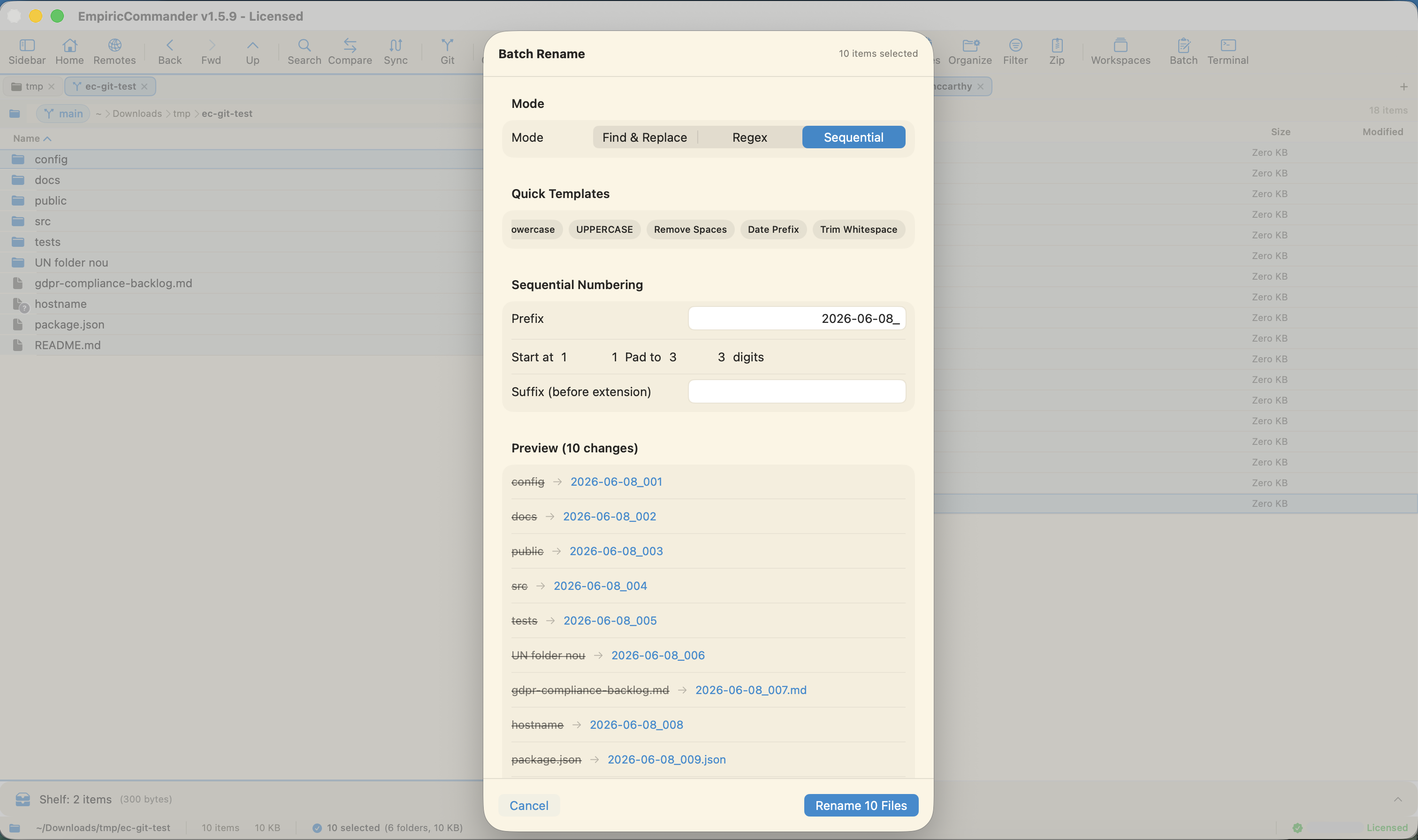
Add an incrementing counter with your own padding and start value - photo_001, photo_002, and so on.
Regex escape hatch
When you need full control, regex with capture groups is still there as a manual mode - reorder date parts, pull out an ID, strip prefixes.
Live preview
Every old name and its new name, side by side, updated as you build the rule. Conflict detection and a 10-second undo are the final net. No surprises.
Across local and remote
Rename in a local folder, on an SFTP server, or in an S3 bucket - the same dual-pane app does all three.
Just describe the rename you want
On a Mac with Apple Intelligence, an optional command bar lets you skip the controls entirely: type what you want in plain English and the on-device model figures out the operation. "Prefix source code files with code_" becomes an Add prefix operation with the argument code_; you see every file resolved in the live preview before anything changes.
The model only ever classifies your request into the same closed set of safe operations and extracts literal arguments - it does not compose regex or any free-form pattern. That is deliberate: the worst case is a wrong-but-valid operation you can see and correct, never a destructive rule that silently mangles names or drops extensions. It runs entirely on-device, so it costs nothing, needs no account, and your filenames never leave your Mac.
The AI command bar requires macOS 26 with Apple Intelligence on Apple Silicon. On any other setup the full manual rename controls are always available - the AI is purely additive.
Patterns, not one-at-a-time edits
The point of a batch renamer is the pattern. A regex like (\d{4})-(\d{2})-(\d{2}) with a replacement of $3-$2-$1 flips every filename's date order in one pass. Capture groups let you extract, reorder, and reformat instead of retyping.
And because there is a live preview, you commit only when the whole list looks right - so a bad rule never touches your files.
Frequently Asked Questions
How do I batch rename files on Mac?
Select the files in EmpiricCommander, open Batch Rename, and either describe the rename in plain words (on Apple Intelligence Macs) or choose an operation yourself - add prefix/suffix, change case, number, change extension, or regex. A live preview shows every new name; apply when it looks right.
Can I rename files just by describing what I want?
Yes, on a Mac with Apple Intelligence (macOS 26 on Apple Silicon). Type something like "prefix source files with code_" and the on-device AI maps it to a safe rename operation and fills in the arguments, shown in the live preview before you apply. It never composes raw patterns, so it cannot produce a destructive rule. It runs entirely on-device - no account, no cost, and your filenames never leave your Mac.
Can I use regular expressions to rename files?
Yes. EmpiricCommander supports regex matching with capture groups, so you can reorder, extract, and reformat parts of each filename, not just replace text.
Can I preview the new names before renaming?
Yes - the live preview lists each file's current and new name as you build the rule, so nothing is renamed until you confirm.
Does batch rename work on remote files too?
Yes. Because EmpiricCommander manages local, SFTP, FTP, S3, and Azure locations in the same app, you can batch rename in any of them.